Golden Hour Ai Photo Editing Prompts: We have seen a lot of these types of images on Instagram for a few days. And it is likely too. Nowadays, it is very popular on Instagram, and somehow most people wonder about creating it, but they don’t know how the image is created. Let me elaborate on it; it can be done within just one click if you entail the right prompt in the right way.
The craze of image creation is going hype, and it proves it. If you put any particular image, whether it is authentic or worse, and place a right prompt, then it will definitely showcase the aesthetic result.
Have you tried it: Music Lover AI Photo Editing Prompts
Why Cinematic Glow AI Images Are Going Viral on Instagram
This trend is exploding for a simple reason: emotion + aesthetics.
Here’s why people love these images:
- ✨ Warm golden-hour lighting
- 🎥 Cinematic depth and soft glow
- 📸 Instagram-ready aesthetic
- 💫 Looks professional and natural
- 🚀 High reach and engagement
These photos feel nostalgic, dreamy, and premium—all at once. want reach and engagement.
What Is Cinematic Glow Photo Editing?
Cinematic glow editing focuses on:
- Warm sunlight tones
- Soft highlights and shadows
- Natural skin tones
- Slight blur in the background
- A calm, emotional atmosphere
AI tools recreate this look by understanding lighting physics and color balance—something that usually takes years of editing experience.
Viral AI Cinematic Glow Photo Editing Prompts
Below are high-quality, ready-to-use prompts you can copy and paste into your AI image generator (like Google Gemini). These prompts are optimized for golden hour and cinematic glow aesthetics.
Prompt #1
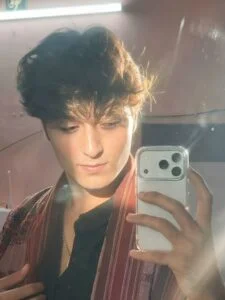
Apply an ethereal lighting filter to the uploaded photo while fully preserving every original detail of the photo unchanged except for lighting, glow, and color mood. Add diffused sunbeams striking the subject’s skin, creating a glowing highlight on cheekbones, nose bridge, lips, and hair strands. Maintain clear separation between bright sunlit areas and soft, deep shadows to create a cinematic high-contrast mood. Inject subtle lens bloom, light haze, and a thin layer of atmospheric glow around the face and shoulders. Render skin with luminous translucency and gentle peachy tones. Enhance stray hair strands backlit by sunlight. Color-grade with slightly lowered saturation, and gentle film-like grain. Keep the overall background intact, but allow sunlight flares and soft bokeh to wrap naturally around the subject. The result should look like a soft, ethereal daydream-sunlit, delicate, and cinematic.
Hard rule: Do not change the face and hair
Prompt #2
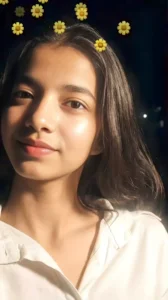
Apply a bold night-flash aesthetic to the uploaded photo while fully preserving every original detail of the photo unchanged except for lighting, glow, and color mood. Keep the nighttime environment dark, deep, and unlit, maintaining all existing shadows and silhouettes. Do not brighten or alter the background except for slightly enhancing existing point lights to keep the night atmosphere realistic. Illuminate the subject with a strong, warm, and direct front-facing flash. The flash should be drawn precisely to the face and upper body, making the subject the brightest element in the entire frame. Add diffused sunbeams striking the subject’s skin, creating a glowing highlight on cheekbones, nose bridge, lips, and hair strands. Maintain clear separation between bright sunlit areas and soft, deep shadows to create a cinematic high-contrast mood. Inject subtle lens bloom, light haze, and a thin layer of atmospheric glow around the face and shoulders. Render skin with luminous translucency
How to Create Cinematic Glow Images in One Click
Follow these simple steps:
- Open Google and Search “Gemini”.
- Upload your photo (optional)
- Select “Nano Banana“
- Paste one of the prompts above
- Click Generate
- Save and share your cinematic image
Time required: under 1 minute
How AI Creates Golden Hour & Glow Effects
AI image generation works by:
- Enhancing light direction and softness
- Adding warm color grading
- Balancing contrast without over-sharpening
- Preserving natural skin texture
- Creating cinematic depth of field
That’s why the output doesn’t look fake—it looks photographed.
Who Can Use These Cinematic Glow Prompts
These prompts are perfect for:
- Instagram creators & influencers
- Boys and girls glow-up photos
- Profile pictures & reels covers
- Lifestyle and aesthetic pages
- Anyone upgrading their feed
No editing background required.
Tips to Make Your Glow Images Look More Real
For best results:
- Use natural facial expressions
- Avoid overly bright backgrounds
- Mention “warm” and “soft” lighting
- Keep prompts realistic, not exaggerated
- Choose outdoor or minimal backgrounds
Subtlety creates realism. visual impact.
Best Platforms to Post Cinematic Glow Photos
These images perform exceptionally well on:
- 📸 Instagram Reels & Posts
- 🎥 YouTube Thumbnails
- 📘 Facebook Pages
- 🧵 Threads
- 🐦 Twitter (X)
They are especially effective for aesthetic and lifestyle niches.
Final Thoughts
The viral cinematic glow and golden hour AI photo trend proves one thing: you don’t need professional editing skills to create stunning visuals anymore. With the right prompt, any image—no matter how simple—can turn into a scroll-stopping masterpiece.
If you want your photos to feel warm, aesthetic, and cinematic, this trend is absolutely worth trying.