Google Gemini Christmas AI Photo: Christmas Day is just around the corner, and the good news is that AI has taken out almost all the editing tools and apps in terms of editing the Christmas photos to wish. Thanks to the image generation tools, such as Google Gemini “Nano Banana”, which simplified more and even more to create multiple images by just entering the prompts.
I am also thrilled about this tool because I have generated lots of images for free without paying a single cost for wishing on Christmas day. And the Gemini has helped me a lot in this circumstance, and it has become a game-changer. You can also generate very well after entering the prompts that I have outlined in this article.
Why Google Gemini AI Is Perfect for Christmas Photo Edits
Gone are the days when advanced photo editing skills were required. Today’s AI tools make creativity accessible to everyone — and Google Gemini does it beautifully:
AI-Powered Image Generation
With Nano Banana and the Gemini ecosystem, you can:
- Upload your photo and automatically apply festive edits
- Create brand-new holiday scenes from scratch
- Transform ordinary photos into cinematic Christmas portraits
- Add snow, cozy lighting, Santa hats, Christmas trees, gifts — and more — with text prompts
All in just a few seconds.
Automatic Style Transformation
Google’s AI understands your photo and can apply complex styles based on what you describe. Whether you want a classic snowy family portrait or a cozy indoor Christmas scene with warm lighting, the tool can deliver amazingly realistic visuals.
Works for Everyone
You don’t need Photoshop, photo-editing experience, or design expertise. The AI does the heavy lifting based on your prompt, making this accessible to beginners and experts alike.
Top Christmas AI Prompt Ideas You Can Use Today
Here, I have elaborated on the top 10 Christmas AI prompts that generate actual images.
Prompt 1
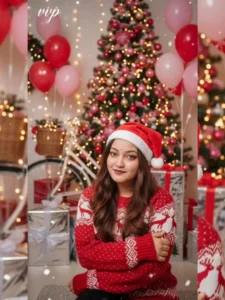
Please generate a image using my picture A striking editorial portrait of a handsome young man in a long, camel-brown overcoat and black leather pants/boots, seated on a black folding chair in the middle of a vast, bright desert with large sand dunes. Harsh, natural light. Fashion photography, high quality, cinematic.
Prompt 2

Ultra realistic 8k instagram portrait (4:5 ratio) of reference image person’s exact face. The guy from reference picture is celebrating Christmas. He is sitting in Santa’s red sleigh. His both legs are out of the sleigh from front. Wearing Santa’s red costume except his hat. Expressions are like model. Having messy hairs with royal expressions on his face. Beside the sleigh, having surprise gifts allover. In background having one window. The night scenes in window with snow and windy effect. Picture is taken from front angle. Take a cinematic shot. Make it realistic 8k DSLR effect image.
Prompt 3
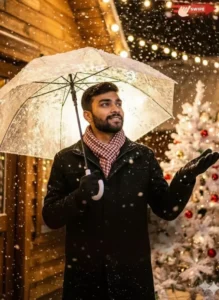
Upload your reference portrait photo, then use this prompt: Use the person from the uploaded reference photo as the main character. Clone their face and identity with 100% accuracy. Maintain the same age, gender, ethnicity, and facial structure. Do not stylize, alter, or reinterpret the face. Create a vertical hyperrealistic winter-night portrait featuring the person from the reference photo. They are standing under a transparent umbrella covered with snow, looking slightly upward with a soft and natural expression. They wear a black winter coat and a red-white checkered scarf, with one hand gently extended to catch falling snowflakes. Environment: Warm string lights in the background, wooden wall textures, and a decorated white Christmas tree with ribbon ornaments. Heavy snowfall illuminated by a strong warm backlight shining through the umbrella, creating a dreamy cinematic atmosphere with visible snow particles. Lighting: Warm backlight plus soft ambient fill. High-contrast snow particles. Soft, glowing, romantic winter mood. Camera: Medium shot, slightly low angle, shallow depth of field, strong bokeh lights, cinematic framing. Style: Hyperrealistic, ultra-detailed, 4K quality. Clean, elegant, and atmospheric. Prioritize accurate face matching to the reference photo over everything else. No text, no watermark.
Must Try: How to Create Car Stunt Reels in 2025
Prompt 4
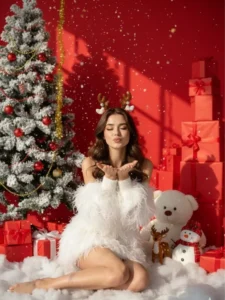
Create a portrait photo of me (face based on the uploaded reference photo). The face must exactly match the person in the reference photo. Do not change the face structure, skin tone or hairstyle in this high-contrast modern fashion portrait. This photo is a vibrant and gorgeous Christmas scene, with red overtones and a festive Christmas atmosphere. She is dressed in a large fluffy dress with white feathers with open shoulders, long puffy hands and a tight white miniskirt with feathers of the same material; showing her elongated legs. Her long black hair is curled, dotted with a reindeer mane on her head. The styling technique is extremely cute and lively: the model sits on fake white snow, hands on her lips posing for a wind kiss (blow kiss), eyes closed with a sweet expression, showing joy and sending congratulations. The shooting technique uses strong and clear light to highlight the color of the dress and the background. The background is a red wall decorated with a large snow-covered Christmas tree and red beads on the left, and a mountain of tall red gifts on the right. The scene is also adorned with lovely decorations such as a giant white teddy bear, a snowman and a reindeer standing in the middle of a pile of gift boxes. The effect of falling snow and golden tinsel (twinkling /twinkling) from above adds to the fanciful and shimmering, creating a perfect Christmas studio photo, filled with energy and vitality. 16K HDR surreal photography, 16-bit color depth, cinematic lighting, panoramic lighting, soft focus, shallow depth of field (f/1.4), high dynamic contrast range, ultra-detailed texture, high definition, professional photo quality, 300dpi resolution – a real masterpiece don’t change my face
Prompt 5

A festive Christmas portrait of a young man standing indoors, wearing a red Santa hat and a cozy red knitted sweater. He is smiling warmly while holding a small decorated Christmas tree with tiny ornaments, gift boxes, and warm fairy lights. Soft snowflakes fall gently around him, adding a magical winter feel. The background is softly blurred with golden Christmas lights and bokeh effects, creating a warm, glowing holiday atmosphere.”
Prompt 6
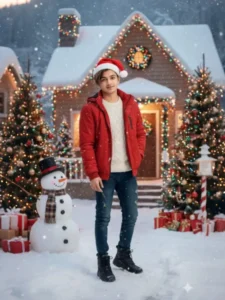
Ultra-realistic Christmas portrait using the real face from the uploaded photo (no face changes); a stylish boy wearing a red Santa cap, winter jacket and jeans; standing outdoors in light snowfall; a snowman nearby, colorful Christmas trees on both sides, and a snowy decorated house in the background; soft smile looking at camera; cinematic DSLR quality, fully realistic Christmas celebration mood.
Prompt 7
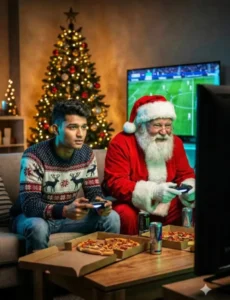
Ultra-realistic cinematic indoor night scene. On the LEFT, a man inspired by the uploaded reference photo sits on a couch wearing a cozy but stylish Christmas sweater, holding a PlayStation controller, focused expression. On the RIGHT, The old man Santa is sitting next to him, leaning forward aggressively with a controller, competitive grin on his face. A large TV in front shows a blurred football or racing game. Christmas tree lights softly illuminate the room, pizza boxes and energy drinks on the table. Warm ambient lighting mixed with neon TV glow, realistic skin and fur textures, cinematic depth of field, premium lifestyle realism, 8K quality.
Prompt 8

You May Love: Dhurandhar Image Prompts
Prompt 9

Ultra-realistic cinematic Christmas interior scene inspired by the reference image. A clean-shaven man with the exact facial features, face shape, skin tone, and proportions of the uploaded photo is sitting casually on a small wooden ladder while decorating a Christmas tree. He is wearing cozy Christmas-themed pajamas: red and green plaid pants, a dark sweater, and a playful Santa hat slightly tilted on his head. His hair and face remain clearly visible, natural and realistic. He is holding a string of colorful Christmas lights in his hands, looking at them with a slightly amused and focused expression. The lights are partially tangled around him and the ladder, creating a fun, candid moment. A fully decorated Christmas tree stands beside him, filled with ornaments, garlands, and warm glowing lights. At the bottom, a friendly dog wearing a small Santa hat looks up toward him, adding warmth and humor to the scene. The environment is a cozy living room with framed artwork on the wall, warm ambient lighting, and a nostalgic holiday atmosphere. Soft shadows, realistic indoor light balance, natural skin texture (no oily look, no plastic skin), shallow depth of field, cinematic color grading, high-end lifestyle photography style, ultra-detailed realism, Nano Banana quality, 8K detail, no text, no logos, no watermarks.
Prompt 10

Please generate a image using my picture A striking editorial portrait of a handsome young man in a long, camel-brown overcoat and black leather pants/boots, seated on a black folding chair in the middle of a vast, bright desert with large sand dunes. Harsh, natural light. Fashion photography, high quality, cinematic.
How to Generate Your Christmas AI Photos (Step-by-Step)
Here’s a simple method to start creating your own Christmas images:
- Open Google Gemini (or the Gemini app with Nano Banana enabled)
- Click the image generation option
- Upload the photo you want to edit
- Paste one of the AI prompts above
- Tap Generate
- Save the final image in HD quality
Your edited Christmas image will be ready in seconds — perfect for sharing on social media or sending to loved ones.
💡 Pro Tip: Be specific in your prompt — the more details you include (lighting, mood, background, style), the more realistic and polished the result will be.
Best Tips for Stunning AI Christmas Edits
Keep Faces Natural
Make sure your prompt instructs the AI to preserve facial features and identity to avoid unnatural outcomes.
Use Warm Lighting
Warm, golden lighting enhances the festive mood and makes images feel cozy and inviting.
Choose a Festive Theme
Whether it’s snow, decorations, Christmas lights, or gifts, a clear theme helps the AI create a more compelling scene.
Final Thoughts
The holiday season is a perfect time to try something new — and Google Gemini’s AI tools make it easier than ever to create beautiful, high-quality Christmas images with minimal effort. Whether you’re making greetings for family, festive posts for Instagram and Facebook, or animated cards for friends, these prompts and tools give you limitless creative potential.
So go ahead, explore your festive creativity — and make this Christmas unforgettable with magical AI-generated images!