Hyper-Realistic Gemini Nano Banana Pro Image Prompts: For a few days, I have been testing lots of image creation tools, but the Gemini is outstanding among all the tools that I have personally tested. The most interesting fact is that the Gemini is almost in the sky and still hopping like a sky rocket.
It creates an image with an authentic experience of your incorporating the skin pores, wrinkles showcased 100% natural, fabric texture, and even lighting on your face and background.
You can create a realistic image, preferring the Gemini Nano banana model and the pro model. There is nothing to say about the difference so far. However, the Pro model is slightly faster than the standard model. So, without any delay, let’s dive into the major topic!
Have you tried it: Music Lover AI Photo Editing Prompts
Why Google Gemini Is Ahead of Other Image Creation Tools
While many AI tools can generate good-looking images, Gemini goes several steps further by focusing on realism rather than artificial perfection.
Here’s what sets Gemini apart:
- Ultra-natural skin pores and wrinkles
- Accurate fabric and clothing textures
- Balanced facial and background lighting
- Realistic shadows and depth
- Professional camera-like output
Instead of producing overly smooth or plastic-looking faces, Gemini preserves human imperfections—making images feel real and believable.
Best Gemini Prompts for Hyper-Realistic Photos
Below are high-quality prompt examples optimized for Gemini Nano Banana and Pro models. You can copy, paste, and customize them.
Prompt #1 (Young Man at Outdoor Café (iPhone Style)

Create a hyper realistic iPhone-style photo of a young man sitting at an outdoor café, leaning forward slightly and smiling mid-conversation. The image has soft computational depth blur behind him, typical of iPhone portrait mode. Natural daylight lights his face evenly, showing realistic pores, light stubble, and smile lines. The background includes blurred chairs, plants, and street details, resembling a casual phone photo. Use aspect ratio 3:4.
Prompt #2 (Young Man Against Concrete Wall)

Create a hyper realistic photo of a young man leaning against a slightly scratched concrete wall, arms loosely crossed, shoulders relaxed. He is wearing a plain cotton hoodie with minor fabric pilling and faded edges near the cuffs. Natural side lighting reveals realistic skin pores, faint acne marks, and uneven facial hair growth. The background shows subtle wall stains and texture, softly blurred like a real portrait shot taken with a mid-range lens. Use aspect ratio 3:4.
Prompt #3 (Older Man in Local Shop)

Create a hyper realistic photo of an older man standing inside a small local shop, hands resting on the counter, posture slightly forward. He is wearing a checked shirt with visible fabric wear and loose threads. Indoor lighting creates uneven illumination across his face, showing deep wrinkles, age spots, and natural skin tone variation. The background includes shelves, handwritten price signs, and cluttered items, softly out of focus like a documentary-style photograph. Use aspect ratio 3:4.
Prompt #4 (Woman Sitting on Outdoor Steps)

Create a hyper realistic photo of a woman sitting on outdoor steps during early evening, one knee raised and one arm resting casually on it. She is wearing worn sneakers and a denim jacket with natural fading and creases. Soft ambient light from the sky mixes with nearby street lighting, creating realistic color balance on her face. The background includes concrete textures, subtle dirt marks, and softly blurred surroundings like a real candid urban photo. Use aspect ratio 3:4.
Prompt #5 (Architect at Drafting Table)
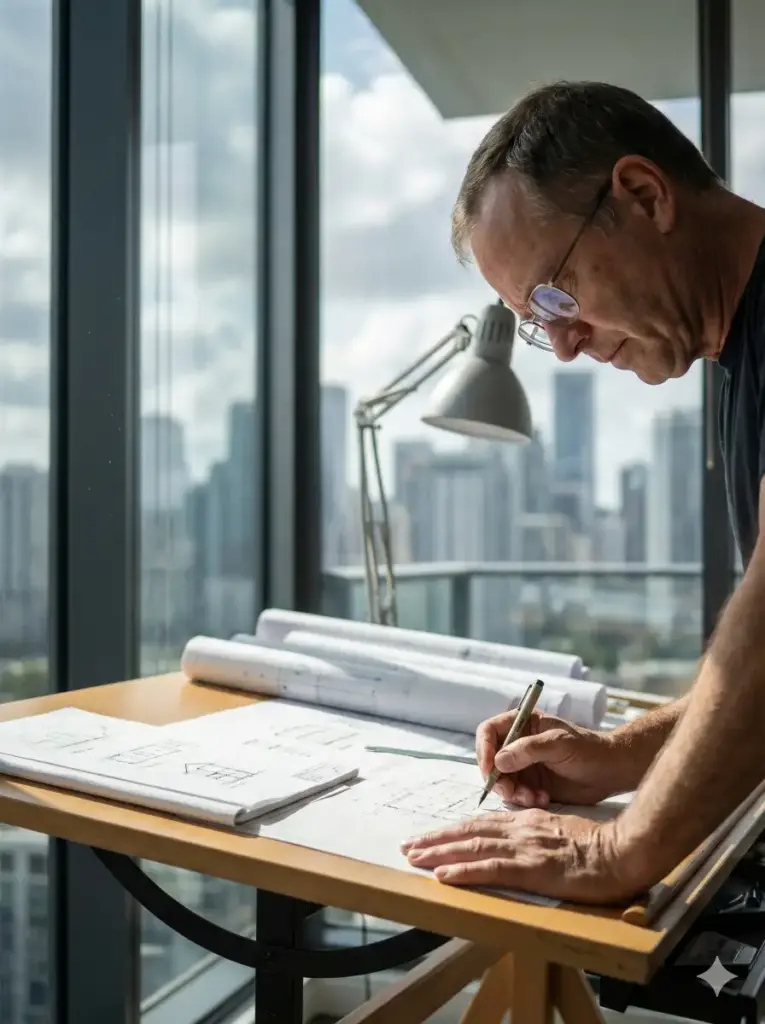
Create a photorealistic lifestyle shot of a professional architect working at a drafting table in a modern, glass-walled office. Natural daylight floods in from the side, illuminating dust motes dancing in the air. The subject is a middle-aged man with glasses; focus on the reflection in the glasses and the texture of his hand holding a pen. The image should be sharp but have a natural fall-off. Skin tones should be accurate and not oversaturated. Shot on a Canon EOS R5, 50mm f/1.8 lens. The background shows a blurred city skyline. Use aspect ratio 3:4.
Prompt #6 (Man Walking Quiet Street)

Create a hyper realistic photo of a man walking along a quiet street, smiling gently while looking down slightly, hands casually in his pockets. He is wearing a light sweater and fitted jeans with natural creases. Bright daylight creates balanced exposure with soft shadows. The image shows realistic skin texture, subtle facial hair, and natural expression lines. The background includes sunlit buildings and trees with shallow depth of field, resembling a real lifestyle photograph. Use aspect ratio 3:4.
Prompt #7 (Middle-Aged Woman on Public Bus)
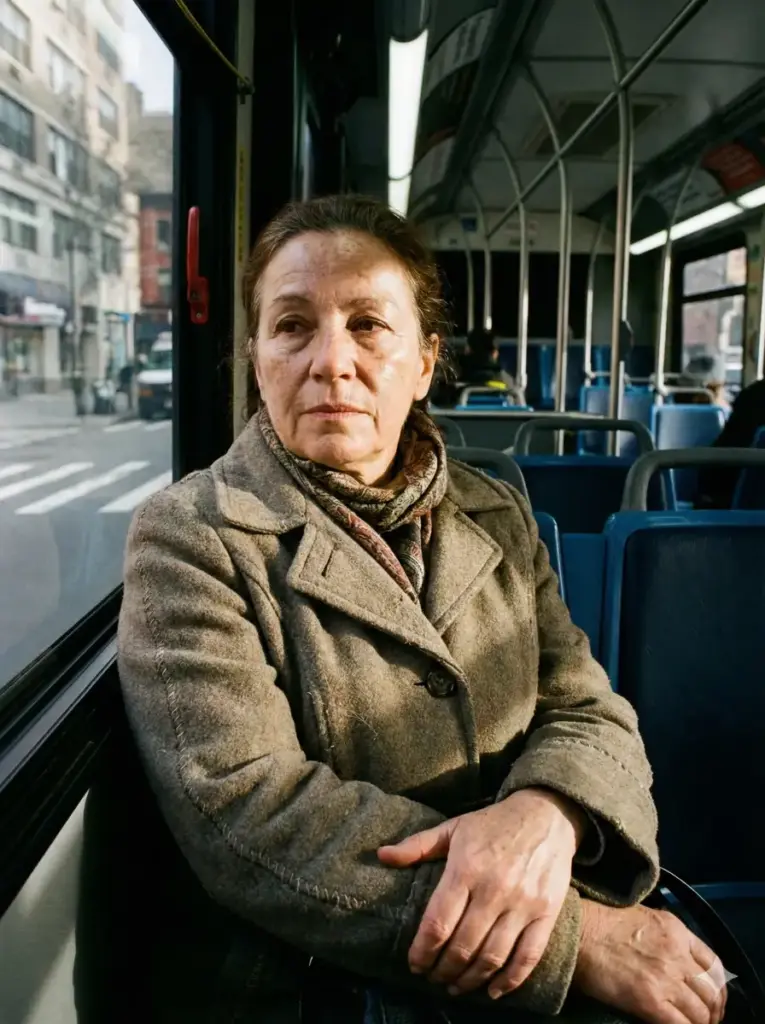
Create a hyper realistic photo of a middle-aged woman sitting on a public bus seat near the window, hands folded loosely in her lap. She is wearing a patterned scarf and a casual coat with visible stitching and fabric wear. Window light illuminates her face unevenly, showing natural wrinkles, freckles, and subtle shine on the skin. The background includes blurred seats, handrails, and passing scenery, with slight motion blur similar to a real handheld photo. Use aspect ratio 3:4.
How to Create Hyper-Realistic Images Using Google Gemini
Follow these simple steps:
- Open Google and Search “Hr Mistry”.
- Copy the “Prompt” and click on “Generate Image.“
- Upload your photo (optional)
- Paste one of the prompts above
- Add custom details (lighting, mood, outfit, background)
- Click Generate
- Save and share your cinematic image
Within seconds, you’ll have a professional-looking Bullet bike image.
Understanding Gemini Nano Banana vs Gemini Pro Model
Google Gemini currently offers two powerful options for image generation: Nano Banana and Pro.
Gemini Nano Banana Model
- Focuses on realism and detail
- Excellent at interpreting creative prompts
- Ideal for portraits and close-ups
- Slightly slower but highly accurate
Gemini Pro Model
- Produces the same level of realism
- Faster image generation
- Better for bulk image creation
- Ideal for professional workflows
📌 Key Insight: In terms of image quality, both models perform almost identically. The main difference is speed, with the Pro model being slightly faster.
What Makes Gemini Images Look Hyper-Realistic
Gemini doesn’t just generate an image—it simulates how a camera sees the world. It understands:
- Light direction and softness
- Natural skin reflections
- Micro-details like pores and fine lines
- Fabric folds and material behavior
- Depth of field and background blur
This is why Gemini images often fool viewers into thinking they were shot using a DSLR or studio setup.
Tips to Maximize Realism in Gemini Images
To get the best possible results:
- Always mention skin texture and natural imperfections
- Specify lighting type (soft studio, window light, sunlight)
- Use phrases like professional photography or DSLR look
- Avoid words like “perfect skin” or “smooth face.”
- Keep prompts clear and intentional
Realism thrives on detail—not exaggeration.
Who Should Use Gemini for Hyper-Realistic Images
Gemini is ideal for:
- Photo editors
- Content creators
- Personal branding
- Profile pictures
- Portfolio images
- Anyone wanting lifelike AI photos
Even beginners can achieve professional results instantly.
Final Thoughts
Google Gemini has redefined what AI image creation can achieve. With the Nano Banana and Pro models, generating hyper-realistic photos no longer requires advanced editing skills or expensive equipment. The realism—from skin pores to fabric textures—is simply unmatched.
If you’re searching for an AI tool that delivers authenticity instead of artificial beauty, Gemini is absolutely worth exploring.